Arduino入門
2. デバイス&サンプル
3. M5Unified
4. M5GFX
5. 拡張モジュール&サンプル
Unit
Module
Atomic
Tab5
IoT
アクセサリー
Stamp-AddOn Cam0308 Arduino チュートリアル
1. 準備
- 環境設定:Arduino IDE はじめにガイド を参照して IDE のインストールを完了してください。
- 使用するライブラリ:
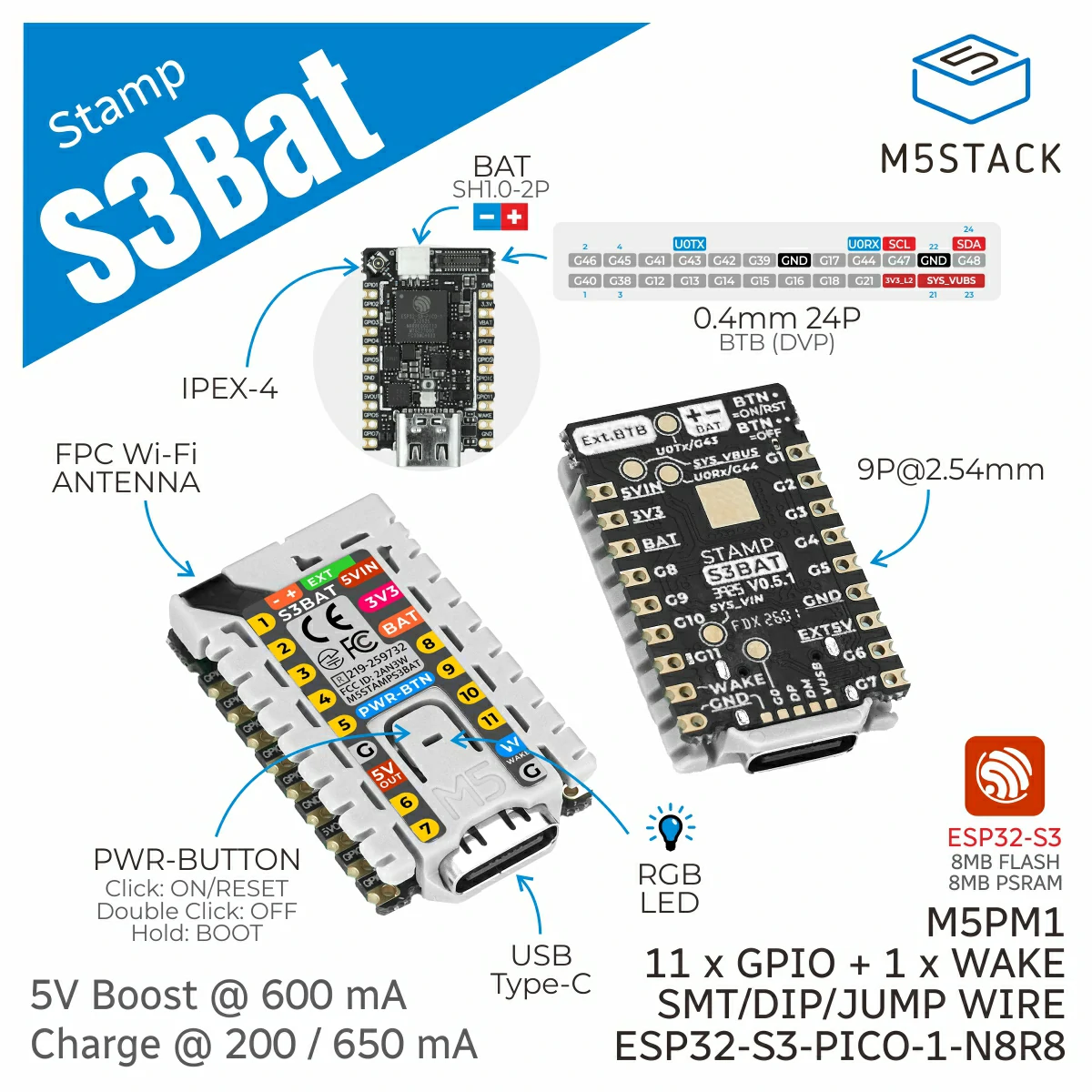
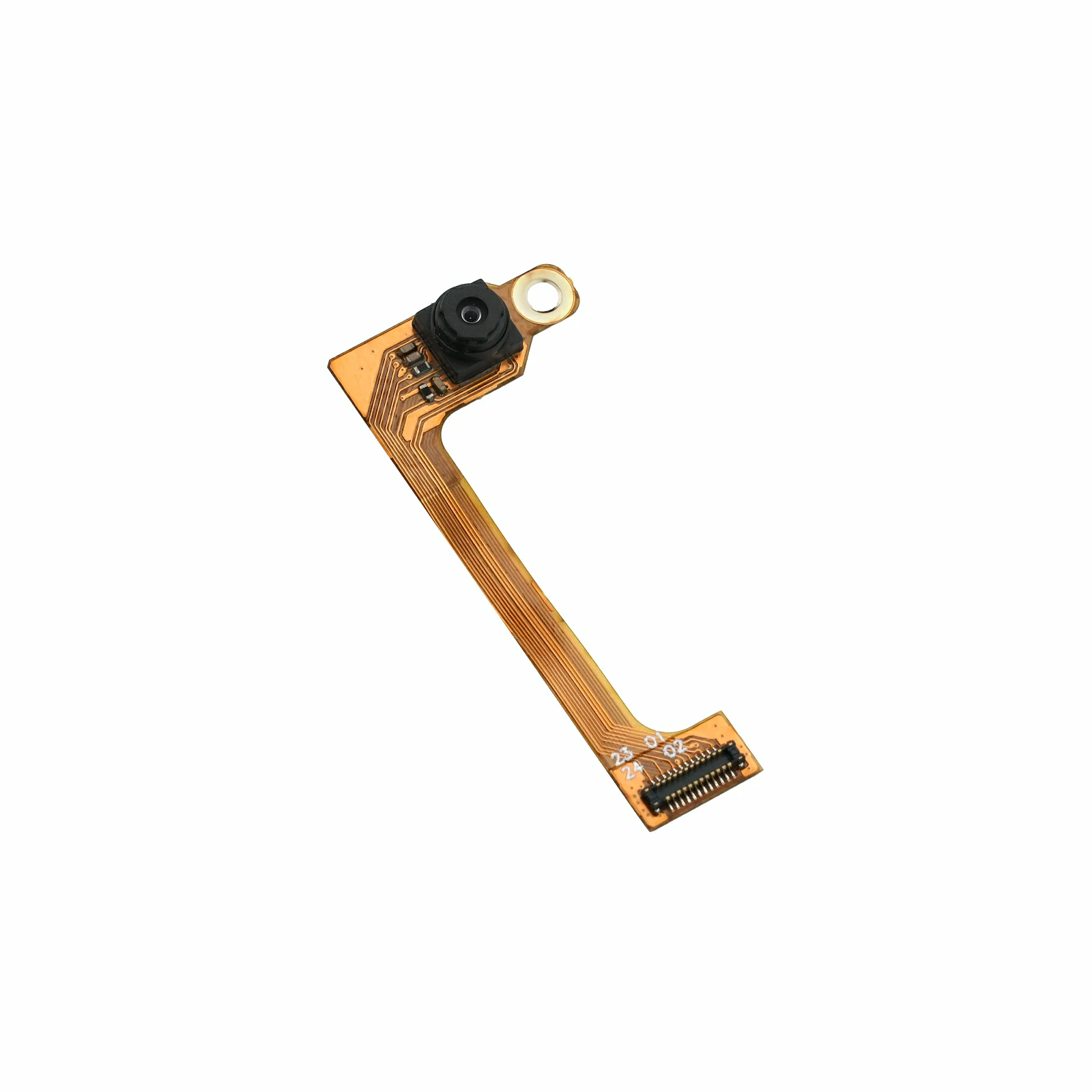
- 使用するハードウェア:
- コンパイル要件:
- M5Stack ボードマネージャのバージョン >= 3.3.8
- ボード設定 = M5StampS3Bat
2. サンプルプログラム
このサンプルでは、GC0308 を QVGA (320 x 240) 解像度および RGB565 出力形式に設定します。Stamp-S3Bat は取得した画像を JPEG に変換し、HTTP サーバーを介して MJPEG ライブストリームと JPEG 静止画撮影機能を提供します。
このサンプルは、AP と STA の 2 種類の Wi-Fi 動作モードに対応しています。CAMERA_USE_AP_MODE の値を変更してモードを切り替えます。AP モードでは 1、STA モードでは 0 に設定してください。
#define CAMERA_USE_AP_MODE 1AP モード
Stamp-S3Bat は、Stamp-AddOn Cam0308 という名前、12345678 というパスワードの Wi-Fi アクセスポイントを作成します。パソコンまたはモバイルデバイスをこのアクセスポイントに接続した後、デフォルトの IP アドレス 192.168.4.1 でカメラにアクセスします。
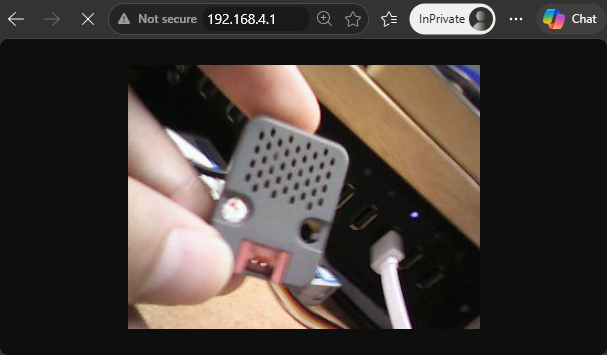
http://192.168.4.1/またはhttp://192.168.4.1/streamにアクセスすると、MJPEG ライブストリームを表示できます。http://192.168.4.1/captureにアクセスすると、JPEG 静止画を取得できます。
STA モード
Stamp-S3Bat は既存の Wi-Fi ネットワークに接続します。使用前に、STA 設定部分の ssid と password を変更してください。接続後、ルーターからデバイスにローカル IP アドレスが割り当てられます。割り当てられたアドレスはシリアルモニタで確認できます。以下の URL にある <デバイス IP> を、シリアルモニタに表示された実際の IP アドレスに置き換えてください。
http://<デバイス IP>/またはhttp://<デバイス IP>/streamにアクセスすると、MJPEG ライブストリームを表示できます。http://<デバイス IP>/captureにアクセスすると、JPEG 静止画を取得できます。
#include <WiFi.h>
#include <WebServer.h>
#include "esp_camera.h"
#include "img_converters.h"

#define CAMERA_USE_AP_MODE 1

#if CAMERA_USE_AP_MODE
const char *ssid     = "Stamp-AddOn Cam0308";
const char *password = "12345678";
#else
const char *ssid     = "ssid";
const char *password = "password";
#endif

WebServer server(80);

#define PWDN_GPIO_NUM  39
#define RESET_GPIO_NUM 41
#define XCLK_GPIO_NUM  46
#define SIOD_GPIO_NUM  48
#define SIOC_GPIO_NUM  47

#define Y9_GPIO_NUM 40
#define Y8_GPIO_NUM 38
#define Y7_GPIO_NUM 12
#define Y6_GPIO_NUM 14
#define Y5_GPIO_NUM 15
#define Y4_GPIO_NUM 16
#define Y3_GPIO_NUM 18
#define Y2_GPIO_NUM 21

#define VSYNC_GPIO_NUM 42
#define HREF_GPIO_NUM  17
#define PCLK_GPIO_NUM  13

static camera_config_t camera_config = {
    .pin_pwdn     = PWDN_GPIO_NUM,
    .pin_reset    = RESET_GPIO_NUM,
    .pin_xclk     = XCLK_GPIO_NUM,
    .pin_sscb_sda = SIOD_GPIO_NUM,
    .pin_sscb_scl = SIOC_GPIO_NUM,
    .pin_d7       = Y9_GPIO_NUM,
    .pin_d6       = Y8_GPIO_NUM,
    .pin_d5       = Y7_GPIO_NUM,
    .pin_d4       = Y6_GPIO_NUM,
    .pin_d3       = Y5_GPIO_NUM,
    .pin_d2       = Y4_GPIO_NUM,
    .pin_d1       = Y3_GPIO_NUM,
    .pin_d0       = Y2_GPIO_NUM,

    .pin_vsync = VSYNC_GPIO_NUM,
    .pin_href  = HREF_GPIO_NUM,
    .pin_pclk  = PCLK_GPIO_NUM,

    .xclk_freq_hz = 20000000,
    .ledc_timer   = LEDC_TIMER_0,
    .ledc_channel = LEDC_CHANNEL_0,

    .pixel_format  = PIXFORMAT_RGB565,
    .frame_size    = FRAMESIZE_QVGA,
    // .frame_size    = FRAMESIZE_VGA,
    .jpeg_quality  = 20,
    .fb_count      = 2,
    .fb_location   = CAMERA_FB_IN_PSRAM,
    .grab_mode     = CAMERA_GRAB_WHEN_EMPTY,
    .sccb_i2c_port = -1,
};

static constexpr char STREAM_BOUNDARY[] = "123456789000000000000987654321";
static constexpr uint8_t JPEG_QUALITY   = 80;

static bool writeAll(WiFiClient &client, const uint8_t *data, size_t length)
{
    while (length > 0 && client.connected()) {
        const size_t written = client.write(data, length);
        if (written == 0) {
            return false;
        }
        data += written;
        length -= written;
        yield();
    }
    return length == 0;
}

static bool captureJpeg(uint8_t **jpgBuffer, size_t *jpgLength)
{
    camera_fb_t *fb = esp_camera_fb_get();
    if (!fb) {
        Serial.println("Camera capture failed");
        return false;
    }

    const bool converted = frame2jpg(fb, JPEG_QUALITY, jpgBuffer, jpgLength);
    esp_camera_fb_return(fb);

    if (!converted || !*jpgBuffer) {
        Serial.println("JPEG convert failed");
        return false;
    }
    return true;
}

static bool cameraBegin()
{
    pinMode(PWDN_GPIO_NUM, OUTPUT);
    digitalWrite(PWDN_GPIO_NUM, LOW);

    pinMode(RESET_GPIO_NUM, OUTPUT);
    digitalWrite(RESET_GPIO_NUM, LOW);
    delay(20);
    digitalWrite(RESET_GPIO_NUM, HIGH);
    delay(100);

    const esp_err_t err = esp_camera_init(&camera_config);
    if (err != ESP_OK) {
        Serial.printf("Camera Init Fail: 0x%x\r\n", err);
        return false;
    }

    sensor_t *sensor = esp_camera_sensor_get();
    if (!sensor) {
        Serial.println("Camera sensor get failed");
        esp_camera_deinit();
        return false;
    }

    Serial.println("Camera Init Success");
    return true;
}

static void handleCapture()
{
    WiFiClient client  = server.client();
    uint8_t *jpgBuffer = nullptr;
    size_t jpgLength   = 0;

    if (!captureJpeg(&jpgBuffer, &jpgLength)) {
        server.send(503, "text/plain", "Camera capture failed\n");
        return;
    }

    client.println("HTTP/1.1 200 OK");
    client.println("Content-Type: image/jpeg");
    client.printf("Content-Length: %u\r\n", static_cast<unsigned int>(jpgLength));
    client.println("Content-Disposition: inline; filename=capture.jpg");
    client.println("Cache-Control: no-store, no-cache, must-revalidate");
    client.println("Pragma: no-cache");
    client.println("Access-Control-Allow-Origin: *");
    client.println("Connection: close");
    client.println();

    writeAll(client, jpgBuffer, jpgLength);
    free(jpgBuffer);
    client.stop();
}

static void handleStream()
{
    WiFiClient client   = server.client();
    int64_t lastFrameUs = esp_timer_get_time();

    client.println("HTTP/1.1 200 OK");
    client.printf("Content-Type: multipart/x-mixed-replace; boundary=%s\r\n", STREAM_BOUNDARY);
    client.println("Cache-Control: no-store, no-cache, must-revalidate");
    client.println("Pragma: no-cache");
    client.println("Access-Control-Allow-Origin: *");
    client.println("Connection: close");
    client.println();

    while (client.connected()) {
        uint8_t *jpgBuffer = nullptr;
        size_t jpgLength   = 0;
        if (!captureJpeg(&jpgBuffer, &jpgLength)) {
            delay(30);
            continue;
        }

        client.printf("--%s\r\n", STREAM_BOUNDARY);
        client.println("Content-Type: image/jpeg");
        client.printf("Content-Length: %u\r\n\r\n", static_cast<unsigned int>(jpgLength));
        const bool sent = writeAll(client, jpgBuffer, jpgLength);
        free(jpgBuffer);

        if (!sent || client.print("\r\n") == 0) {
            break;
        }

        const int64_t nowUs       = esp_timer_get_time();
        const int64_t frameTimeMs = (nowUs - lastFrameUs) / 1000;
        lastFrameUs               = nowUs;
        const float fps           = frameTimeMs > 0 ? 1000.0f / frameTimeMs : 0.0f;
        Serial.printf("MJPG: %uKB %lldms (%.1ffps)\r\n", static_cast<unsigned int>(jpgLength / 1024), frameTimeMs, fps);
        yield();
    }

    client.stop();
}

static IPAddress startWiFi()
{
#if CAMERA_USE_AP_MODE
    WiFi.mode(WIFI_AP);
    if (!WiFi.softAP(ssid, password)) {
        Serial.println("WiFi AP start failed");
        return IPAddress();
    }

    const IPAddress ip = WiFi.softAPIP();
    Serial.printf("WiFi AP: %s\r\n", ssid);
    Serial.printf("IP address: %s\r\n", ip.toString().c_str());
    return ip;
#else
    WiFi.mode(WIFI_STA);
    WiFi.setSleep(false);
    WiFi.begin(ssid, password);

    Serial.print("Connecting to WiFi");
    while (WiFi.status() != WL_CONNECTED) {
        delay(500);
        Serial.print(".");
    }

    Serial.println();
    const IPAddress ip = WiFi.localIP();
    Serial.printf("IP address: %s\r\n", ip.toString().c_str());
    return ip;
#endif
}

void setup()
{
    Serial.begin(115200);
    delay(1000);

    if (!cameraBegin()) {
        while (true) {
            delay(1000);
        }
    }

    const IPAddress ip = startWiFi();
    if (ip == IPAddress()) {
        while (true) {
            delay(1000);
        }
    }

    server.on("/", HTTP_GET, handleStream);
    server.on("/stream", HTTP_GET, handleStream);
    server.on("/capture", HTTP_GET, handleCapture);
    server.onNotFound([]() { server.send(404, "text/plain", "Not found\n"); });
    server.begin();

    Serial.println("Camera HTTP server started");
    Serial.printf("Stream:  http://%s/stream\r\n", ip.toString().c_str());
    Serial.printf("Capture: http://%s/capture\r\n", ip.toString().c_str());
}

void loop()
{
    server.handleClient();
    delay(1);
}3. コンパイルとアップロード
- Arduino IDE で
M5StampS3Batボードとデバイスに対応するポートを選択します。 - Arduino IDE 左上のコンパイル・アップロードボタンをクリックします。プログラムのコンパイルとデバイスへのアップロードが完了するまで待ちます。
4. 実行結果
プログラムを起動したら、パソコンまたはモバイルデバイスを Wi-Fi アクセスポイント Stamp-AddOn Cam0308 に接続します。パスワードは 12345678 です。接続後、ブラウザで http://192.168.4.1/stream を開くとライブストリームを表示でき、http://192.168.4.1/capture を開くと静止画を取得できます。シリアルモニタには、デバイスの IP アドレス、アクセス URL、フレームサイズ、転送時間、およびフレームレートが表示されます。
シリアル出力例:
Camera Init Success
WiFi AP: Stamp-AddOn Cam0308
IP address: 192.168.4.1
Camera HTTP server started
Stream:  http://192.168.4.1/stream
Capture: http://192.168.4.1/capture
MJPG: 12KB 118ms (8.5fps)
MJPG: 12KB 91ms (11.0fps)
MJPG: 13KB 138ms (7.2fps)
MJPG: 12KB 122ms (8.2fps)
MJPG: 12KB 110ms (9.1fps)
MJPG: 12KB 150ms (6.7fps)
MJPG: 12KB 110ms (9.1fps)
MJPG: 12KB 102ms (9.8fps)
MJPG: 12KB 97ms (10.3fps)
MJPG: 12KB 97ms (10.3fps)
MJPG: 12KB 137ms (7.3fps)ブラウザアクセス例: