

Arduino 上手教程
2. 设备开发 & 案例程序
Demo Board-SHT30
3. M5Unified
4. M5GFX
5. 扩展模块
Unit
Module
Atomic
Tab5
IoT
Chain Captain Button 按键
Chain Captain 按键输入相关 API 与案例程序。
注意
使用时需要在主循环中包含
M5.update() 函数用于读取状态更新,并尽可能减少阻塞,否则可能无法及时获取按键变化状态。案例程序
编译要求
- M5Stack 板管理版本 >=
3.3.10-a - 开发板选项 =
M5ChainCaptain - M5Unified 库版本 >=
0.3.0 - M5GFX 库版本 >=
0.3.0
cpp
1 2 3 4 5 6 7 8 9 10 11 12 13 14 15 16 17 18 19 20 21 22 23 24 25 26 27 28 29 30 31 32 33 34 35 36 37 38 39 40 41 42 43 44 45 46 47 48 49 50 51 52 53 54 55 56 57 58 59 60 61 62 63 64 65 66 67 68 69 70 71 72
#include <M5Unified.h>

static void drawButtons(bool a, bool b, bool c)
{
  M5.Display.startWrite();
  M5.Display.fillScreen(TFT_BLACK);
  M5.Display.setTextDatum(middle_center);
  M5.Display.setFont(&fonts::FreeSansBold12pt7b);
  M5.Display.setTextColor(TFT_WHITE, TFT_BLACK);
  M5.Display.drawString("Press A / B / C", 120, 36);

  const uint16_t colors[3] = {TFT_GREEN, TFT_YELLOW, TFT_BLUE};
  const bool pressed[3] = {a, b, c};
  const char* labels[3] = {"A", "B", "C"};

  for (int i = 0; i < 3; ++i) {
    const int x = 12 + i * 76;
    const uint16_t fill = pressed[i] ? colors[i] : 0x2124;
    M5.Display.fillRoundRect(x, 92, 64, 64, 10, fill);
    M5.Display.drawRoundRect(x, 92, 64, 64, 10, TFT_WHITE);
    M5.Display.setTextColor(TFT_WHITE, fill);
    M5.Display.drawString(labels[i], x + 32, 124);
  }

  M5.Display.setFont(&fonts::FreeSans9pt7b);
  M5.Display.setTextColor(TFT_WHITE, TFT_BLACK);
  M5.Display.drawCenterString("Light when pressed", 120, 190);
  M5.Display.endWrite();
}

void setup()
{
  delay(500);
  auto cfg = M5.config();
  cfg.serial_baudrate = 115200;
  M5.begin(cfg);

  M5.Display.setRotation(0);
  M5.Display.setBrightness(128);
  drawButtons(false, false, false);
}

void loop()
{
  M5.update();

  static bool lastA = false;
  static bool lastB = false;
  static bool lastC = false;

  // Keys are active low; M5Unified enables the pull-ups.
  const bool a = M5.BtnA.isPressed();
  const bool b = M5.BtnB.isPressed();
  const bool c = M5.BtnC.isPressed();

  if (a != lastA || b != lastB || c != lastC) {
    lastA = a;
    lastB = b;
    lastC = c;
    drawButtons(a, b, c);
  }

  if (M5.BtnA.wasPressed()) Serial.println("KEYA pressed");
  if (M5.BtnB.wasPressed()) Serial.println("KEYB pressed");
  if (M5.BtnC.wasPressed()) Serial.println("KEYC pressed");

  if (M5.BtnA.wasClicked()) Serial.println("KEYA clicked");
  if (M5.BtnB.wasClicked()) Serial.println("KEYB clicked");
  if (M5.BtnC.wasClicked()) Serial.println("KEYC clicked");

  delay(10);
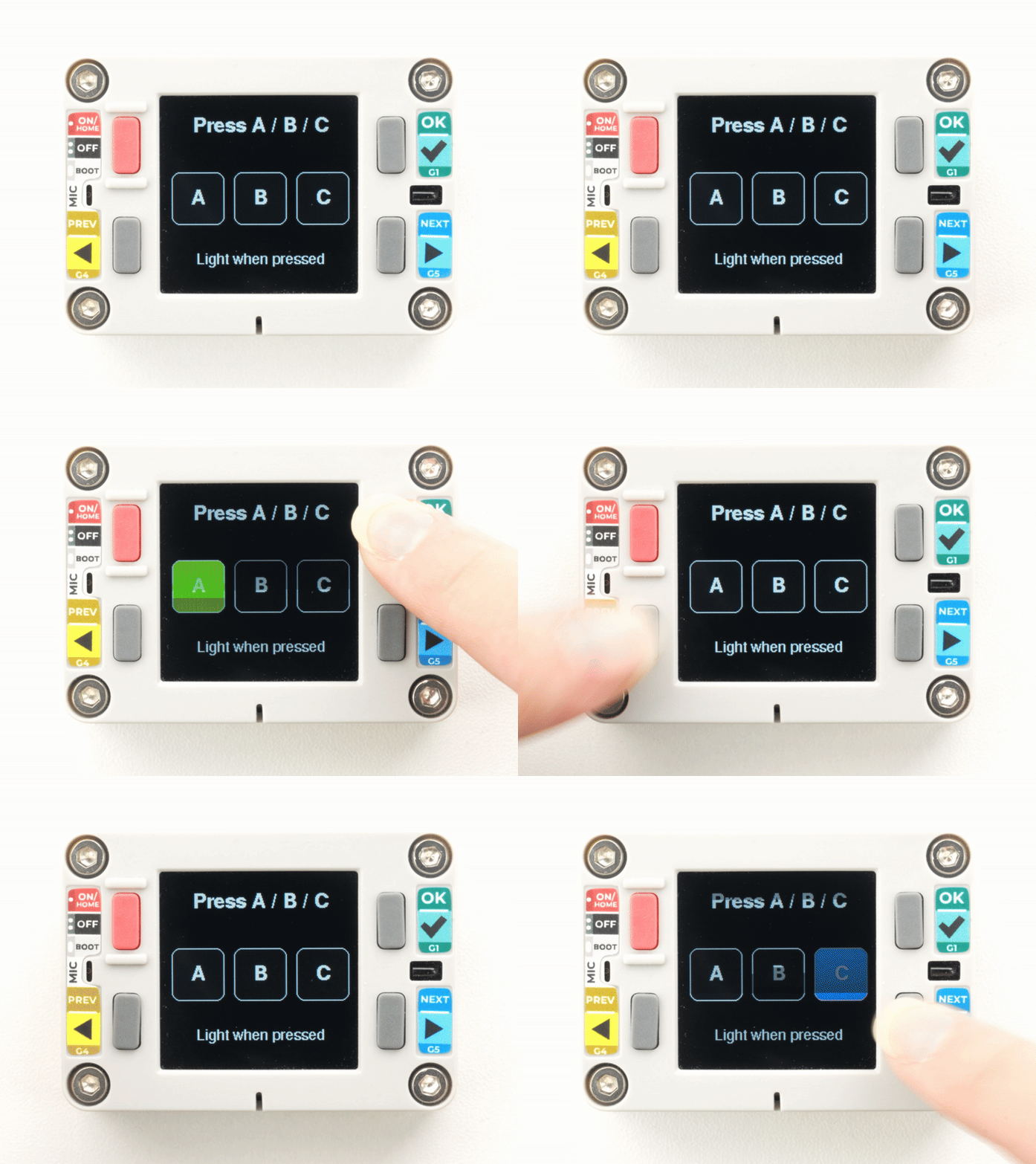
}屏幕显示三个按键框,按住对应按键时方框会以绿、黄、蓝填充,串口监视器会输出按下和单击事件。
API
Chain Captain 按键部分使用 M5Unified 库中的 Button_Class,更多按键相关的 API 可以参考下方文档:
Page Tools