

Arduino 上手教程
2. 设备开发 & 案例程序
Demo Board-SHT30
3. M5Unified
4. M5GFX
5. 扩展模块
Unit
Module
Atomic
Tab5
IoT
Chain Captain IR 红外收发
Chain Captain 红外发送与接收相关 API 与案例程序。
案例程序
编译要求
- M5Stack 板管理版本 >=
3.3.10-a - 开发板选项 =
M5ChainCaptain - M5Unified 库版本 >=
0.3.0 - M5GFX 库版本 >=
0.3.0 - M5IOE1 库版本 >=
1.0.9 - IRremote 库版本 >=
4.7.1
Chain Captain 红外电源由 M5IOE1 IO2 控制,使用前必须将其配置为高电平。
cpp
1 2 3 4 5 6 7 8 9 10 11 12 13 14 15 16 17 18 19 20 21 22 23 24 25 26 27 28 29 30 31 32 33 34 35 36 37 38 39 40 41 42 43 44 45 46 47 48 49 50 51 52 53 54 55 56 57 58 59 60 61 62 63 64 65 66 67 68 69 70 71 72 73 74 75 76 77 78 79 80 81 82 83 84 85 86 87 88 89 90 91 92 93 94 95 96 97 98 99 100
#include <IRremote.hpp>
#include <M5Unified.h>
#include <M5IOE1.h>

#define IR_SEND_PIN 48
#define IR_RECEIVE_PIN 47

uint16_t address = 0x0000;
uint8_t command = 0x10;
uint8_t repeats = 0;

M5IOE1 ioExpander;

void setup()
{
  delay(500);
  M5.begin();
  Serial.begin(115200);
  delay(200);

  M5.Display.setTextColor(TFT_BLACK);
  M5.Display.setTextFont(&fonts::FreeMonoBoldOblique9pt7b);
  M5.Display.clear(TFT_WHITE);
  M5.Display.setCursor(0, 0);
  M5.Display.printf("Chain Captain IR");
  Serial.println("Chain Captain IR TX/RX");

  if (ioExpander.begin(&M5.In_I2C, M5IOE1_DEFAULT_ADDR_2,
                       M5IOE1_I2C_FREQ_100K) != M5IOE1_OK) {
    Serial.println("M5IOE1 init failed");
    while (true) {
      delay(1000);
    }
  }
  // IO2 powers the IR transmitter and receiver.
  ioExpander.pinMode(M5IOE1_PIN_2, OUTPUT);
  ioExpander.digitalWrite(M5IOE1_PIN_2, HIGH);

  IrReceiver.begin(IR_RECEIVE_PIN);
  IrSender.begin(DISABLE_LED_FEEDBACK);
  IrSender.setSendPin(IR_SEND_PIN);

  M5.Display.setCursor(0, 20);
  M5.Display.println("A: send & receive");
  Serial.printf("IR Send Pin: %d, IR Recv Pin: %d\n", IR_SEND_PIN, IR_RECEIVE_PIN);
  delay(500);
}

void loop()
{
  M5.update();

  if (!M5.BtnA.wasClicked()) {
    delay(10);
    return;
  }

  // 1. Send one NEC frame
  Serial.printf("Send NEC: addr=0x%04x, cmd=0x%02x\n", address, command);
  IrSender.sendNEC(address, command, repeats);

  M5.Display.fillRect(0, 20, 240, 70, TFT_WHITE);
  M5.Display.setCursor(0, 24);
  M5.Display.printf("Send NEC:\n addr=0x%04x\n cmd=0x%02x\n", address, command);
  M5.Display.drawFastHLine(0, 86, 240, TFT_BLACK);

  IrReceiver.restartAfterSend();

  // 2. Decode the reflected frame.
  delay(20);

  if (IrReceiver.decode()) {
    Serial.printf("Received: protocol=%s, addr=0x%04x, cmd=0x%02x, raw=0x%08lx\n",
                  getProtocolString(IrReceiver.decodedIRData.protocol),
                  IrReceiver.decodedIRData.address,
                  IrReceiver.decodedIRData.command,
                  (unsigned long)IrReceiver.decodedIRData.decodedRawData);

    M5.Display.fillRect(0, 92, 240, 148, TFT_WHITE);
    M5.Display.setCursor(0, 96);
    M5.Display.printf("Received:\n protocol=%s\n addr=0x%04x\n cmd=0x%02x\n raw=0x%08lx\n",
                      getProtocolString(IrReceiver.decodedIRData.protocol),
                      IrReceiver.decodedIRData.address,
                      IrReceiver.decodedIRData.command,
                      (unsigned long)IrReceiver.decodedIRData.decodedRawData);

    IrReceiver.resume();
  } else {
    Serial.println("No IR received.");
    M5.Display.fillRect(0, 92, 240, 148, TFT_WHITE);
    M5.Display.setCursor(0, 96);
    M5.Display.println("No IR received.");
  }

  address += 0x0001;
  command += 0x01;
  repeats = 0;

  delay(200);
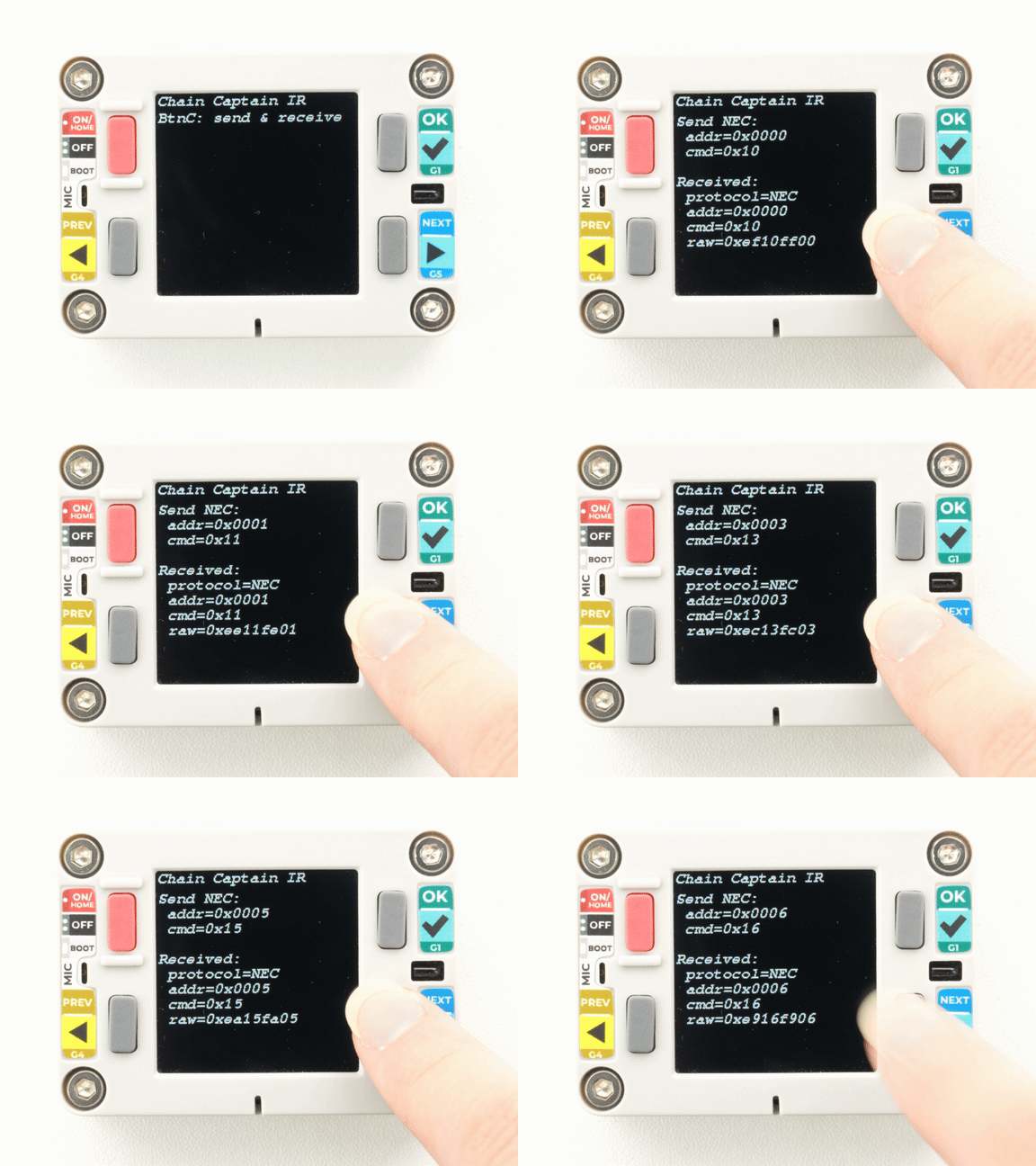
}按动 KEYA 发送一次 NEC 编码,随后重新开启接收头,解码自身发出的信号(近距离反射/耦合)。屏幕上方显示发送信息,下方显示解析结果。
API
Chain Captain 红外收发使用 IRremote 库,更多相关 API 可以参考下方文档:
Page Tools