

Arduino入門
2. デバイス&サンプル
Demo Board-SHT30
3. M5Unified
4. M5GFX
5. 拡張モジュール&サンプル
Unit
Module
Atomic
Tab5
IoT
アクセサリー
Chain Captain RGB LED
Chain Captain の RGB LED に関する API とサンプルプログラム。
サンプルプログラム
コンパイル要件
- M5Stack ボードマネージャーバージョン >=
3.3.10-a - ボードオプション =
M5ChainCaptain - M5Unified ライブラリバージョン >=
0.3.0 - M5GFX ライブラリバージョン >=
0.3.0 - M5IOE1 ライブラリバージョン >=
1.0.9
Chain Captain の RGB LED は、M5IOE1 の 3 系統の PWM 出力で制御されます:
| RGB LED | M5IOE1 ピン | PWM チャンネル |
|---|---|---|
| R | IO10 | PWM4 |
| G | IO8 | PWM2 |
| B | IO9 | PWM1 |
注意
M5IOE1 の GPIO および PWM 出力はデフォルトでオープンドレインです。RGB LED には外部プルアップがないため、
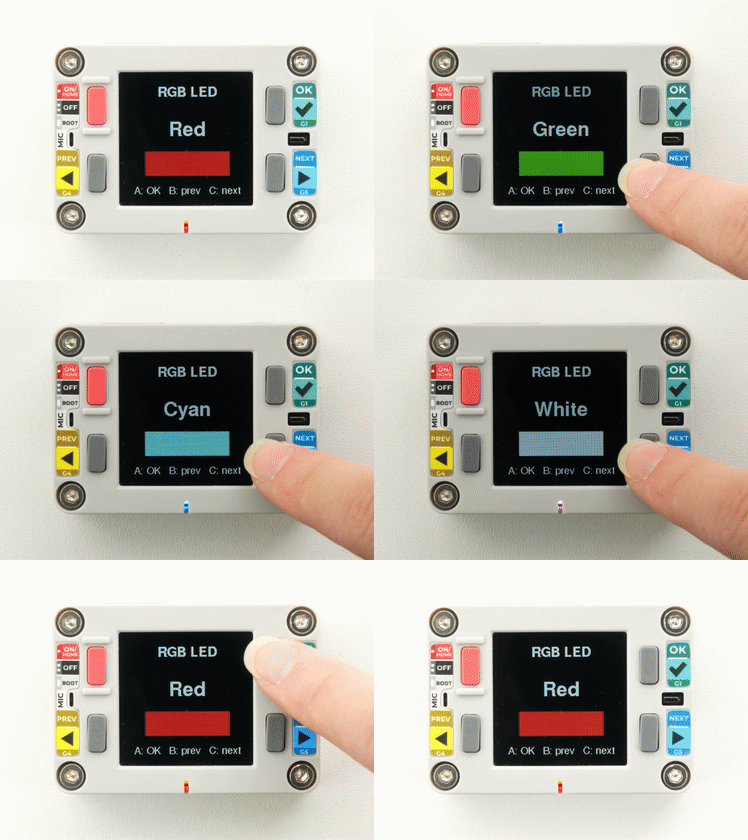
analogWrite() のみを呼び出して駆動モードを設定しない場合、PWM ピンは High レベルを出力できず、LED は点灯しません。まず setDriveMode() で IO8、IO9、IO10 をプッシュプル出力に設定してください。KEYB / KEYC で前 / 次の色を選択し、KEYA で確定します(LED の消灯または復帰)。
cpp
1 2 3 4 5 6 7 8 9 10 11 12 13 14 15 16 17 18 19 20 21 22 23 24 25 26 27 28 29 30 31 32 33 34 35 36 37 38 39 40 41 42 43 44 45 46 47 48 49 50 51 52 53 54 55 56 57 58 59 60 61 62 63 64 65 66 67 68 69 70 71 72 73 74 75 76 77 78 79 80 81 82 83 84 85 86 87 88 89 90 91 92 93 94 95 96 97 98 99 100 101 102 103 104 105 106 107 108 109 110 111 112 113 114 115 116
#include <M5Unified.h>
#include <M5IOE1.h>

M5IOE1 ioExpander;

static const uint8_t COLORS[][3] = {
  {255, 0, 0},
  {0, 255, 0},
  {0, 0, 255},
  {255, 255, 0},
  {0, 255, 255},
  {255, 0, 255},
  {255, 255, 255},
};

static const char* COLOR_NAMES[] = {
  "Red", "Green", "Blue", "Yellow", "Cyan", "Magenta", "White",
};

static const size_t COLOR_COUNT = sizeof(COLORS) / sizeof(COLORS[0]);

static size_t colorIndex = 0;
static bool ledEnabled = true;

static void setRgb(uint8_t r, uint8_t g, uint8_t b)
{
  // R=IO10/PWM4, G=IO8/PWM2, B=IO9/PWM1
  ioExpander.analogWrite(M5IOE1_PWM_CH4, r);
  ioExpander.analogWrite(M5IOE1_PWM_CH2, g);
  ioExpander.analogWrite(M5IOE1_PWM_CH1, b);
}

static void drawStatus()
{
  M5.Display.startWrite();
  M5.Display.fillScreen(TFT_BLACK);
  M5.Display.setTextDatum(middle_center);
  M5.Display.setFont(&fonts::FreeSansBold12pt7b);
  M5.Display.setTextColor(TFT_WHITE, TFT_BLACK);
  M5.Display.drawString("RGB LED", 120, 36);
  M5.Display.setTextColor(TFT_WHITE, TFT_BLACK);
  M5.Display.setFont(&fonts::FreeSansBold18pt7b);
  M5.Display.drawString(ledEnabled ? COLOR_NAMES[colorIndex] : "Off", 120, 104);

  if (ledEnabled) {
    const auto& color = COLORS[colorIndex];
    M5.Display.fillRect(44, 142, 152, 44,
                        M5.Display.color565(color[0], color[1], color[2]));
  } else {
    M5.Display.drawRect(44, 142, 152, 44, TFT_WHITE);
  }

  M5.Display.setFont(&fonts::FreeSans9pt7b);
  M5.Display.setTextColor(TFT_WHITE, TFT_BLACK);
  M5.Display.drawString("A: OK   B: prev   C: next", 120, 214);
  M5.Display.endWrite();
}

void setup()
{
  delay(500);
  auto cfg = M5.config();
  cfg.serial_baudrate = 115200;
  M5.begin(cfg);

  M5.Display.setRotation(0);
  M5.Display.setBrightness(128);

  if (ioExpander.begin(&M5.In_I2C, 0x4F, 100000,
                       M5IOE1_INT_MODE_DISABLED) != M5IOE1_OK) {
    Serial.println("M5IOE1 init failed");
    M5.Display.setTextDatum(middle_center);
    M5.Display.drawString("M5IOE1 init failed", 120, 120);
    return;
  }

  // PWM outputs are open-drain by default; use push-pull for the RGB LED.
  ioExpander.setDriveMode(M5IOE1_PIN_10, M5IOE1_DRIVE_PUSHPULL); // R: IO10
  ioExpander.setDriveMode(M5IOE1_PIN_8, M5IOE1_DRIVE_PUSHPULL);  // G: IO8
  ioExpander.setDriveMode(M5IOE1_PIN_9, M5IOE1_DRIVE_PUSHPULL);  // B: IO9

  ioExpander.setPwmFrequency(5000);
  setRgb(COLORS[colorIndex][0], COLORS[colorIndex][1], COLORS[colorIndex][2]);
  drawStatus();
}

void loop()
{
  M5.update();

  if (M5.BtnB.wasClicked()) {
    colorIndex = (colorIndex + COLOR_COUNT - 1) % COLOR_COUNT;
    ledEnabled = true;
    setRgb(COLORS[colorIndex][0], COLORS[colorIndex][1], COLORS[colorIndex][2]);
    drawStatus();
  }

  if (M5.BtnC.wasClicked()) {
    colorIndex = (colorIndex + 1) % COLOR_COUNT;
    ledEnabled = true;
    setRgb(COLORS[colorIndex][0], COLORS[colorIndex][1], COLORS[colorIndex][2]);
    drawStatus();
  }

  if (M5.BtnA.wasClicked()) {
    ledEnabled = !ledEnabled;
    if (ledEnabled) {
      setRgb(COLORS[colorIndex][0], COLORS[colorIndex][1], COLORS[colorIndex][2]);
    } else {
      setRgb(0, 0, 0);
    }
    drawStatus();
  }

  delay(20);
}アップロード後、RGB LED はデフォルトで赤色に点灯します。KEYB / KEYC で前 / 次の色に切り替え、KEYA で LED を消灯または復帰できます。画面にも現在の色が同期して表示されます。
API
Chain Captain の RGB LED は M5IOE1 の PWM 出力で制御されます。その他の関連 API と情報については、以下のドキュメントを参照してください:
Page Tools