

Arduino入門
2. デバイス&サンプル
Demo Board-SHT30
3. M5Unified
4. M5GFX
5. 拡張モジュール&サンプル
Unit
Module
Atomic
Tab5
IoT
アクセサリー
Chain Captain RTC リアルタイムクロック
Chain Captain の RTC クロックに関する API とサンプルプログラム。
サンプルプログラム
コンパイル要件
- M5Stack ボードマネージャーバージョン >=
3.3.10-a - ボードオプション =
M5ChainCaptain - M5Unified ライブラリバージョン >=
0.3.0 - M5GFX ライブラリバージョン >=
0.3.0
説明
RX8130CE は常時オンの
3V3_L0 電源で供給されるため、バッテリー残量がある限り、コントローラーが電源オフでも RTC は計時を続けます。注意
M5PM1 と M5IOE1 は I2C アイドルスリープに対応しており、バッテリー駆動でシャットダウンした後に再起動すると、スリープ状態のまま応答に時間がかかる場合があります。その状態で直ちに
M5.begin() を実行すると初期化に失敗する可能性があるため、初期化前に 500ms 待つことを推奨します。RTC 時刻設定
cpp
1 2 3 4 5 6 7 8 9 10 11 12 13 14 15 16 17 18 19 20 21 22 23 24 25 26 27 28 29 30 31 32 33 34 35 36 37 38 39 40 41 42 43 44 45 46 47 48 49 50 51 52 53 54 55 56 57 58 59 60 61 62 63 64 65 66 67 68 69 70 71 72 73 74 75 76 77 78 79 80 81 82 83 84 85 86 87 88 89 90 91 92 93 94 95
#include <M5Unified.h>

M5Canvas canvas(&M5.Display);

static const char* WEEK_DAYS[] = {
  "Sun", "Mon", "Tue", "Wed", "Thu", "Fri", "Sat",
};

static void drawTime()
{
  if (!M5.Rtc.isEnabled()) return;

  auto dt = M5.Rtc.getDateTime();

  canvas.fillSprite(TFT_BLACK);
  canvas.setTextDatum(middle_center);
  canvas.setFont(&fonts::FreeSansBold12pt7b);
  canvas.setTextColor(TFT_WHITE, TFT_BLACK);
  canvas.drawString("RX8130CE RTC", 120, 30);

  char dateLine[32];
  char timeLine[24];
  snprintf(dateLine, sizeof(dateLine), "%04d/%02d/%02d  %s",
           dt.date.year, dt.date.month, dt.date.date,
           WEEK_DAYS[(dt.date.weekDay + 7) % 7]);
  snprintf(timeLine, sizeof(timeLine), "%02d:%02d:%02d",
           dt.time.hours, dt.time.minutes, dt.time.seconds);

  canvas.setFont(&fonts::FreeSansBold12pt7b);
  canvas.drawString(dateLine, 120, 100);
  canvas.setFont(&fonts::FreeSansBold18pt7b);
  canvas.drawString(timeLine, 120, 145);

  canvas.setFont(&fonts::FreeSans9pt7b);
  canvas.drawString("A: set demo time", 120, 210);
  canvas.pushSprite(0, 0);
}

static void setDemoTime()
{
  M5.Rtc.setDateTime({{2026, 11, 4}, {12, 34, 56}});
  Serial.println("RTC time set to 2026/11/04 12:34:56");
}

void setup()
{
  // Wait for M5PM1/M5IOE1 to exit I2C idle sleep after a battery-powered restart.
  delay(500);

  auto cfg = M5.config();
  cfg.serial_baudrate = 115200;
  M5.begin(cfg);

  M5.Display.setRotation(0);

  // Retry RTC init if it is not ready.
  for (int i = 0; i < 5 && !M5.Rtc.isEnabled(); ++i) {
    delay(200);
    M5.Rtc.begin(&M5.In_I2C, M5.getBoard());
  }

  // Set backlight after M5IOE1 is ready.
  M5.Display.setBrightness(128);

  canvas.createSprite(M5.Display.width(), M5.Display.height());

  if (!M5.Rtc.isEnabled()) {
    canvas.fillSprite(TFT_BLACK);
    canvas.setTextDatum(middle_center);
    canvas.setTextColor(TFT_RED, TFT_BLACK);
    canvas.drawString("RTC not found", 120, 120);
    canvas.pushSprite(0, 0);
    Serial.println("RTC not found");
    return;
  }

  if (M5.Rtc.getDateTime().date.year < 2025) setDemoTime();
  drawTime();
}

void loop()
{
  M5.update();

  if (M5.BtnA.wasClicked()) setDemoTime();

  static uint32_t lastRefresh = 0;
  const uint32_t now = millis();
  if (now - lastRefresh >= 500) {
    lastRefresh = now;
    drawTime();
  }

  delay(20);
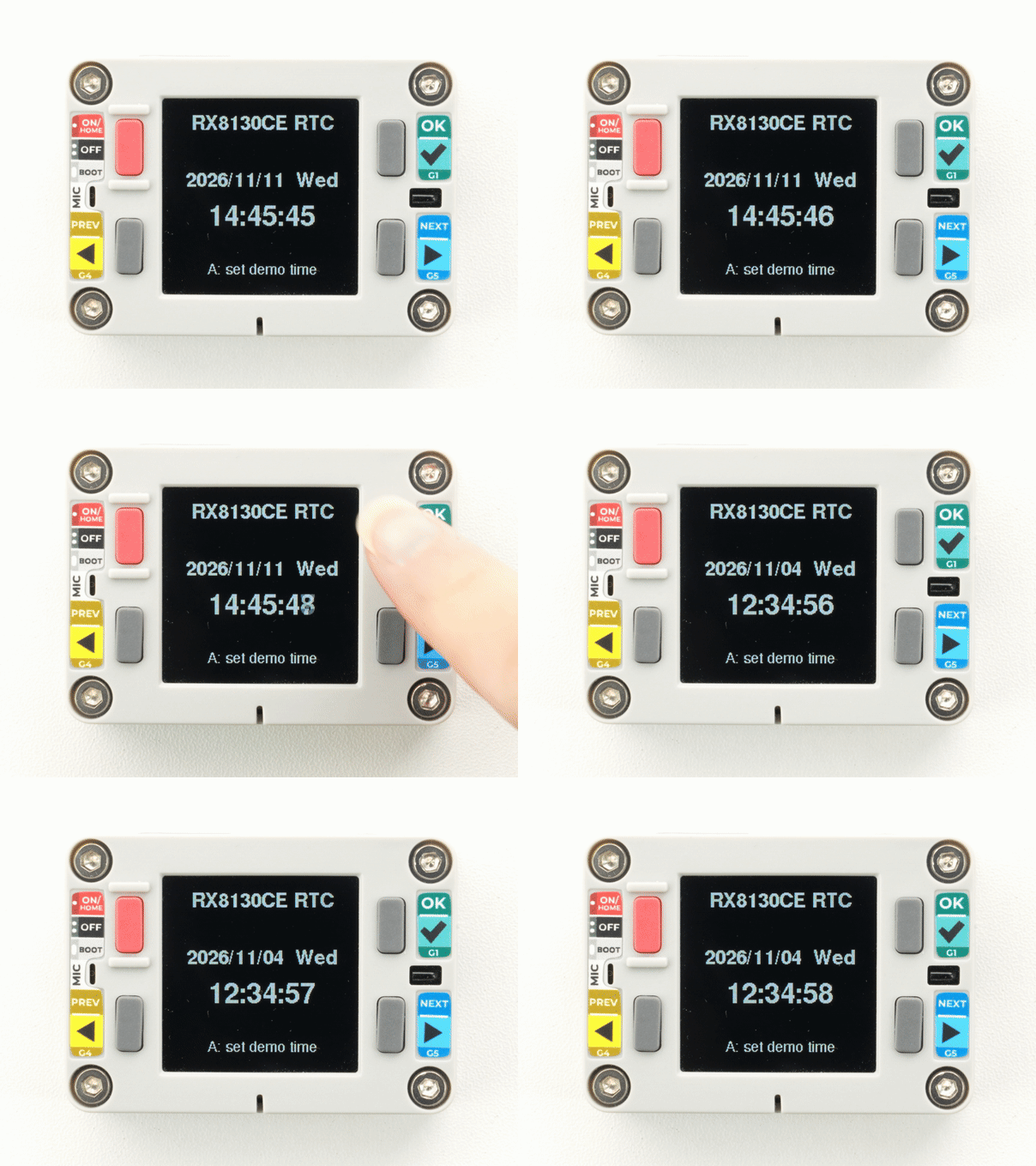
}アップロード後、画面に RTC の日付、曜日、時刻が表示されます。KEYA を押すと、時刻をサンプル時刻 2026/11/04 12:34:56 に設定できます。
ネットワーク時刻同期
Wi-Fi に接続すると、SNTP でネットワーク時刻を取得し、RX8130CE に書き込めます。以下のサンプルは setup() で 1 回時刻同期を行い、その後 loop() で RTC 時刻を読み取ります。
説明
WIFI_SSID と WIFI_PASSWORD を実際の Wi-Fi 名とパスワードに置き換えてください。cpp
1 2 3 4 5 6 7 8 9 10 11 12 13 14 15 16 17 18 19 20 21 22 23 24 25 26 27 28 29 30 31 32 33 34 35 36 37 38 39 40 41 42 43 44 45 46 47 48 49 50 51 52 53 54 55 56 57 58 59 60 61 62 63 64 65 66 67 68 69 70 71 72 73 74 75 76 77 78 79 80 81 82 83 84 85 86 87 88 89 90 91 92 93 94 95 96 97 98 99 100 101 102 103 104 105 106 107 108 109 110 111 112 113 114 115 116 117 118 119 120 121 122 123 124
#define WIFI_SSID     "your-ssid"
#define WIFI_PASSWORD "your-password"
#define NTP_TIMEZONE  "CST-8" // POSIX Timezone format, UTC+8
#define NTP_SERVER1   "0.pool.ntp.org"
#define NTP_SERVER2   "1.pool.ntp.org"
#define NTP_SERVER3   "2.pool.ntp.org"

#include <WiFi.h>
#include <M5Unified.h>

#if __has_include(<esp_sntp.h>)
#include <esp_sntp.h>
#define SNTP_ENABLED 1
#elif __has_include(<sntp.h>)
#include <sntp.h>
#define SNTP_ENABLED 1
#endif

#ifndef SNTP_ENABLED
#define SNTP_ENABLED 0
#endif

M5Canvas canvas(&M5.Display);

static const char* WEEK_DAYS[] = {
  "Sun", "Mon", "Tue", "Wed", "Thu", "Fri", "Sat",
};

void setup()
{
  // Wait for M5PM1/M5IOE1 to exit I2C idle sleep after a battery-powered restart.
  delay(500);

  auto cfg = M5.config();
  cfg.serial_baudrate = 115200;
  M5.begin(cfg);

  M5.Display.setRotation(0);

  // Retry RTC init if it is not ready.
  for (int i = 0; i < 5 && !M5.Rtc.isEnabled(); ++i) {
    delay(200);
    M5.Rtc.begin(&M5.In_I2C, M5.getBoard());
  }

  // Set backlight after M5IOE1 is ready.
  M5.Display.setBrightness(128);

  canvas.createSprite(M5.Display.width(), M5.Display.height());
  canvas.setTextDatum(middle_center);
  canvas.setFont(&fonts::FreeSansBold12pt7b);
  canvas.setTextColor(TFT_WHITE, TFT_BLACK);

  if (!M5.Rtc.isEnabled()) {
    canvas.fillSprite(TFT_BLACK);
    canvas.drawString("RTC not found", 120, 120);
    canvas.pushSprite(0, 0);
    return;
  }

  canvas.fillSprite(TFT_BLACK);
  canvas.drawString("WiFi connecting...", 120, 80);
  canvas.pushSprite(0, 0);

  WiFi.mode(WIFI_STA);
  WiFi.begin(WIFI_SSID, WIFI_PASSWORD);
  while (WiFi.status() != WL_CONNECTED) {
    delay(500);
    Serial.print('.');
  }

  canvas.fillSprite(TFT_BLACK);
  canvas.drawString("NTP syncing...", 120, 120);
  canvas.pushSprite(0, 0);

  configTzTime(NTP_TIMEZONE, NTP_SERVER1, NTP_SERVER2, NTP_SERVER3);
#if SNTP_ENABLED
  while (sntp_get_sync_status() != SNTP_SYNC_STATUS_COMPLETED) {
    delay(500);
  }
#else
  struct tm timeInfo;
  while (!getLocalTime(&timeInfo, 1000)) {
    delay(500);
  }
#endif

  time_t t = time(nullptr) + 1;
  while (t > time(nullptr)) {
    delay(10);
  }
  M5.Rtc.setDateTime(localtime(&t));
  Serial.println("\nRTC synchronized");
}

void loop()
{
  M5.update();

  if (!M5.Rtc.isEnabled()) {
    delay(1000);
    return;
  }

  auto dt = M5.Rtc.getDateTime();
  char dateLine[32];
  char timeLine[24];
  snprintf(dateLine, sizeof(dateLine), "%04d/%02d/%02d  %s",
           dt.date.year, dt.date.month, dt.date.date,
           WEEK_DAYS[(dt.date.weekDay + 7) % 7]);
  snprintf(timeLine, sizeof(timeLine), "%02d:%02d:%02d",
           dt.time.hours, dt.time.minutes, dt.time.seconds);

  canvas.fillSprite(TFT_BLACK);
  canvas.setTextDatum(middle_center);
  canvas.setTextColor(TFT_WHITE, TFT_BLACK);
  canvas.setFont(&fonts::FreeSansBold12pt7b);
  canvas.drawString(dateLine, 120, 100);
  canvas.setFont(&fonts::FreeSansBold18pt7b);
  canvas.drawString(timeLine, 120, 145);
  canvas.pushSprite(0, 0);

  delay(500);
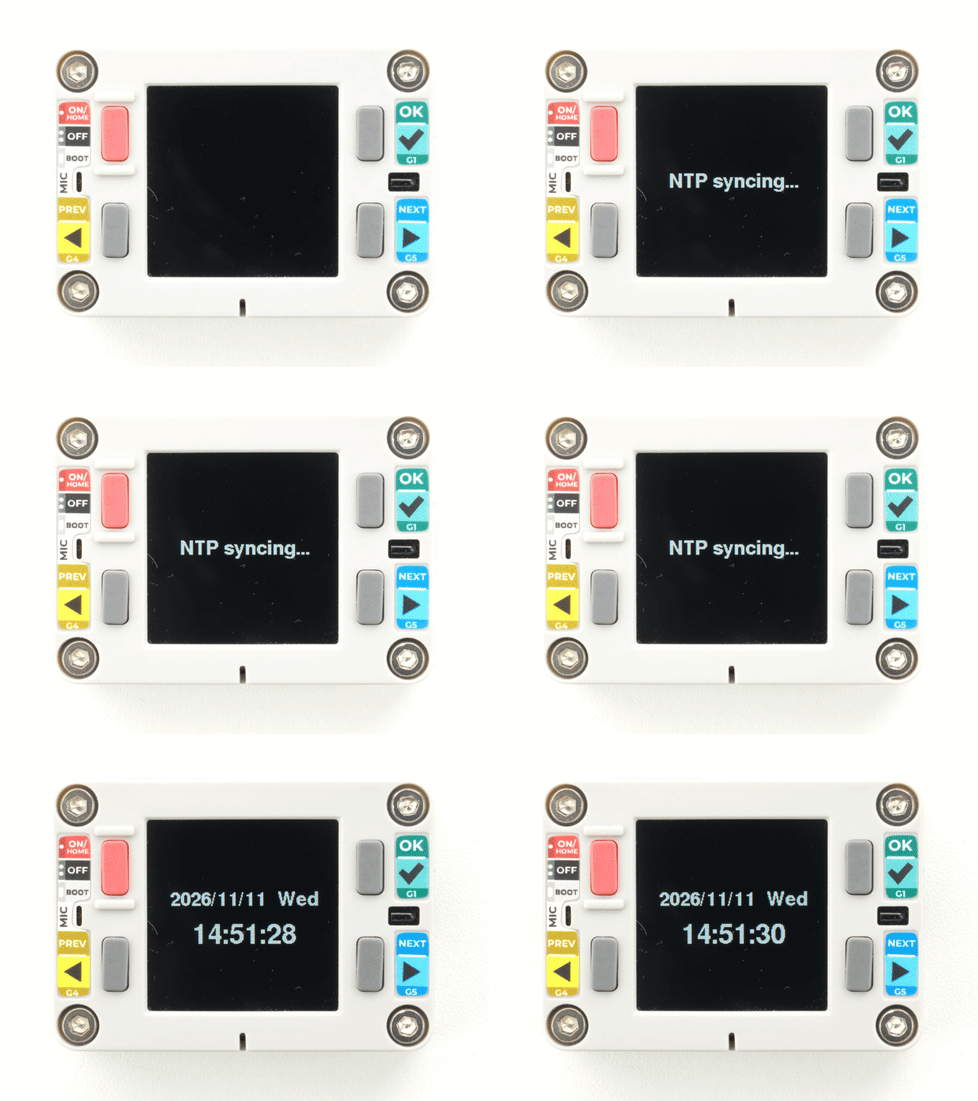
}アップロード後、画面に補正された RTC の日付、曜日、時刻が表示されます。
API
Chain Captain の RTC は M5Unified ライブラリの RTC_Class を使用します。その他の関連 API については、以下のドキュメントを参照してください:
Page Tools