

Arduino入門
2. デバイス&サンプル
Demo Board-SHT30
3. M5Unified
4. M5GFX
5. 拡張モジュール&サンプル
Unit
Module
Atomic
Tab5
IoT
アクセサリー
Chain Captain Speaker スピーカー
Chain Captain のスピーカーに関する API とサンプルプログラム。
サンプルプログラム
コンパイル要件
- M5Stack ボードマネージャーバージョン >=
3.3.10-a - ボードオプション =
M5ChainCaptain - M5Unified ライブラリバージョン >=
0.3.0 - M5GFX ライブラリバージョン >=
0.3.0
Chain Captain のアンプイネーブルピンは G21 で、オーディオ電源は M5IOE1 の IO5 で制御されます。M5.Speaker.begin() を呼び出すと、M5Unified が対応する I2S ピンとアンプイネーブルを設定します。
cpp
1 2 3 4 5 6 7 8 9 10 11 12 13 14 15 16 17 18 19 20 21 22 23 24 25 26 27 28 29 30 31 32 33 34 35 36 37 38 39 40 41 42 43 44 45 46 47 48 49 50 51 52 53 54 55 56 57 58 59 60 61 62 63 64 65 66 67 68 69 70 71 72
#include <M5Unified.h>

static const uint16_t NOTES[] = {
  262, 294, 330, 349, 392, 440, 494, 523,
};

static const char* NOTE_NAMES[] = {
  "C4", "D4", "E4", "F4", "G4", "A4", "B4", "C5",
};

static const size_t NOTE_COUNT = sizeof(NOTES) / sizeof(NOTES[0]);
static size_t noteIndex = 0;

static void drawNote()
{
  M5.Display.startWrite();
  M5.Display.fillScreen(TFT_BLACK);
  M5.Display.setTextDatum(middle_center);
  M5.Display.setFont(&fonts::FreeSansBold12pt7b);
  M5.Display.setTextColor(TFT_WHITE, TFT_BLACK);
  M5.Display.drawString("Speaker Test", 120, 34);
  M5.Display.setFont(&fonts::FreeSansBold24pt7b);
  M5.Display.drawString(NOTE_NAMES[noteIndex], 120, 108);
  M5.Display.setFont(&fonts::FreeSans9pt7b);
  M5.Display.drawString("A: stop   B: prev   C: next", 120, 184);
  M5.Display.endWrite();
}

static void playNote()
{
  drawNote();
  // tone() is non-blocking; the note stops automatically.
  M5.Speaker.tone(NOTES[noteIndex], 350);
  Serial.printf("Play %s: %u Hz\n", NOTE_NAMES[noteIndex], NOTES[noteIndex]);
}

void setup()
{
  delay(500);
  auto cfg = M5.config();
  cfg.serial_baudrate = 115200;
  M5.begin(cfg);

  M5.Display.setRotation(0);
  M5.Display.setBrightness(128);

  M5.Speaker.begin();
  M5.Speaker.setVolume(100);
  drawNote();
}

void loop()
{
  M5.update();

  if (M5.BtnB.wasClicked()) {
    noteIndex = (noteIndex + NOTE_COUNT - 1) % NOTE_COUNT;
    playNote();
  }

  if (M5.BtnC.wasClicked()) {
    noteIndex = (noteIndex + 1) % NOTE_COUNT;
    playNote();
  }

  if (M5.BtnA.wasClicked()) {
    M5.Speaker.stop();
    Serial.println("Speaker stopped");
  }

  delay(20);
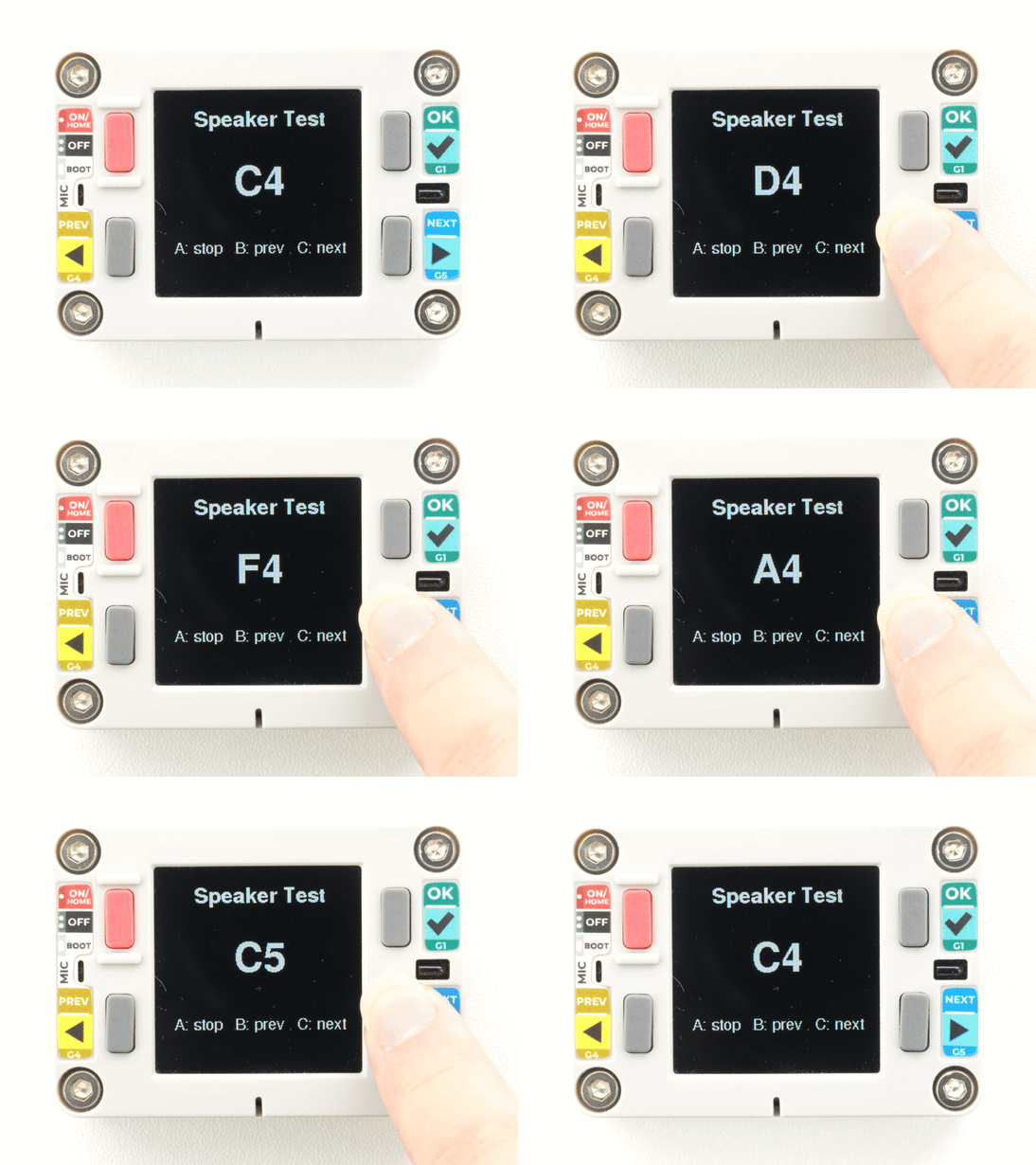
}アップロード後、KEYB / KEYC で前 / 次の音階を再生でき、画面に現在の音名が同期して表示されます。KEYA を押すと現在の音を停止します。
API
Chain Captain のスピーカーは M5Unified ライブラリの Speaker_Class を使用します。その他の関連 API については、以下のドキュメントを参照してください:
Page Tools