

Arduino入門
2. デバイス&サンプル
Demo Board-SHT30
3. M5Unified
4. M5GFX
5. 拡張モジュール&サンプル
Unit
Module
Atomic
Tab5
IoT
アクセサリー
Chain ENV 使用チュートリアル
1. 準備作業
環境設定:Arduino IDE 入門チュートリアルを参照して IDE をインストールし、使用する開発ボードに応じて対応するボードマネージャーと必要なドライバライブラリをインストールします。
使用するドライバライブラリ:
使用するハードウェア製品:
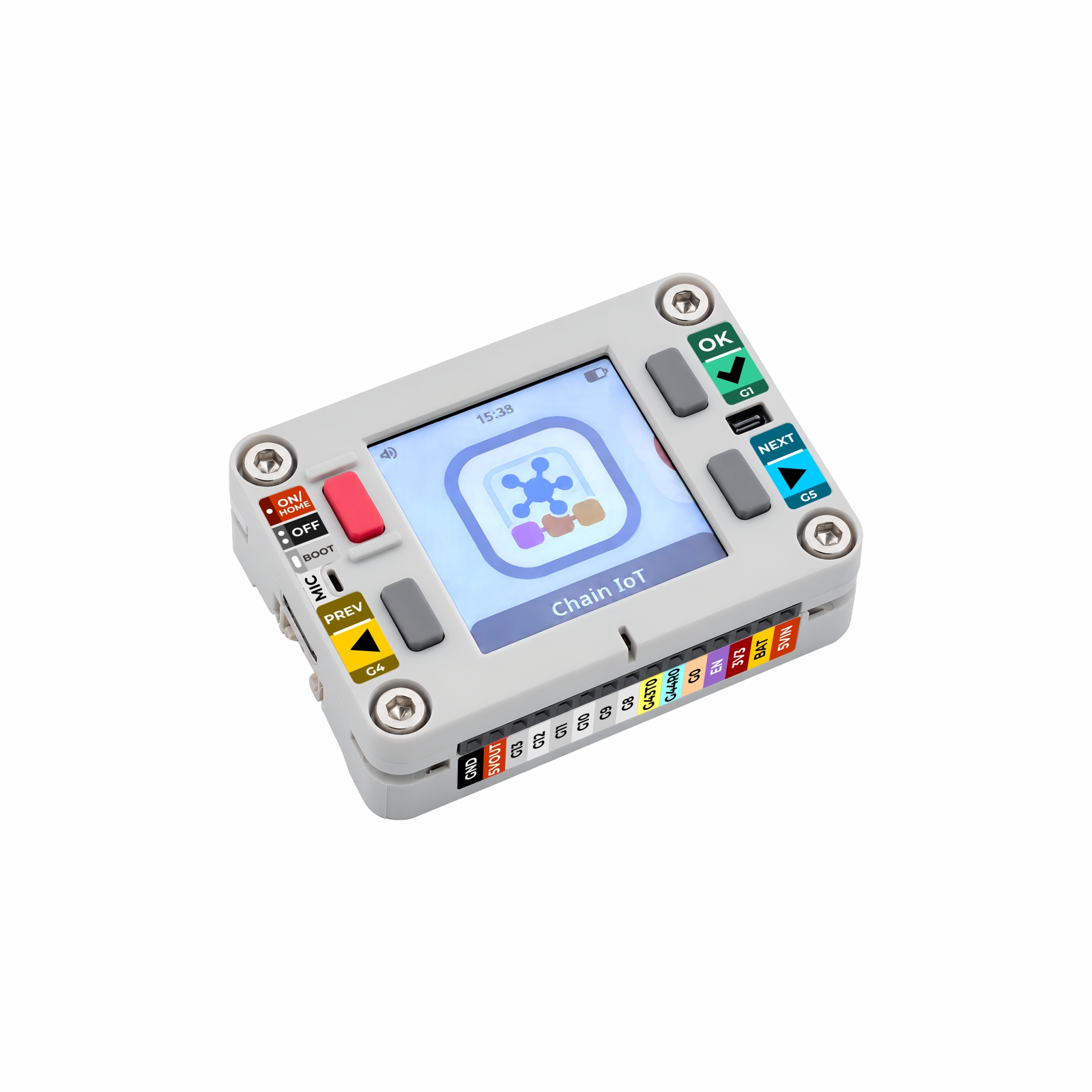
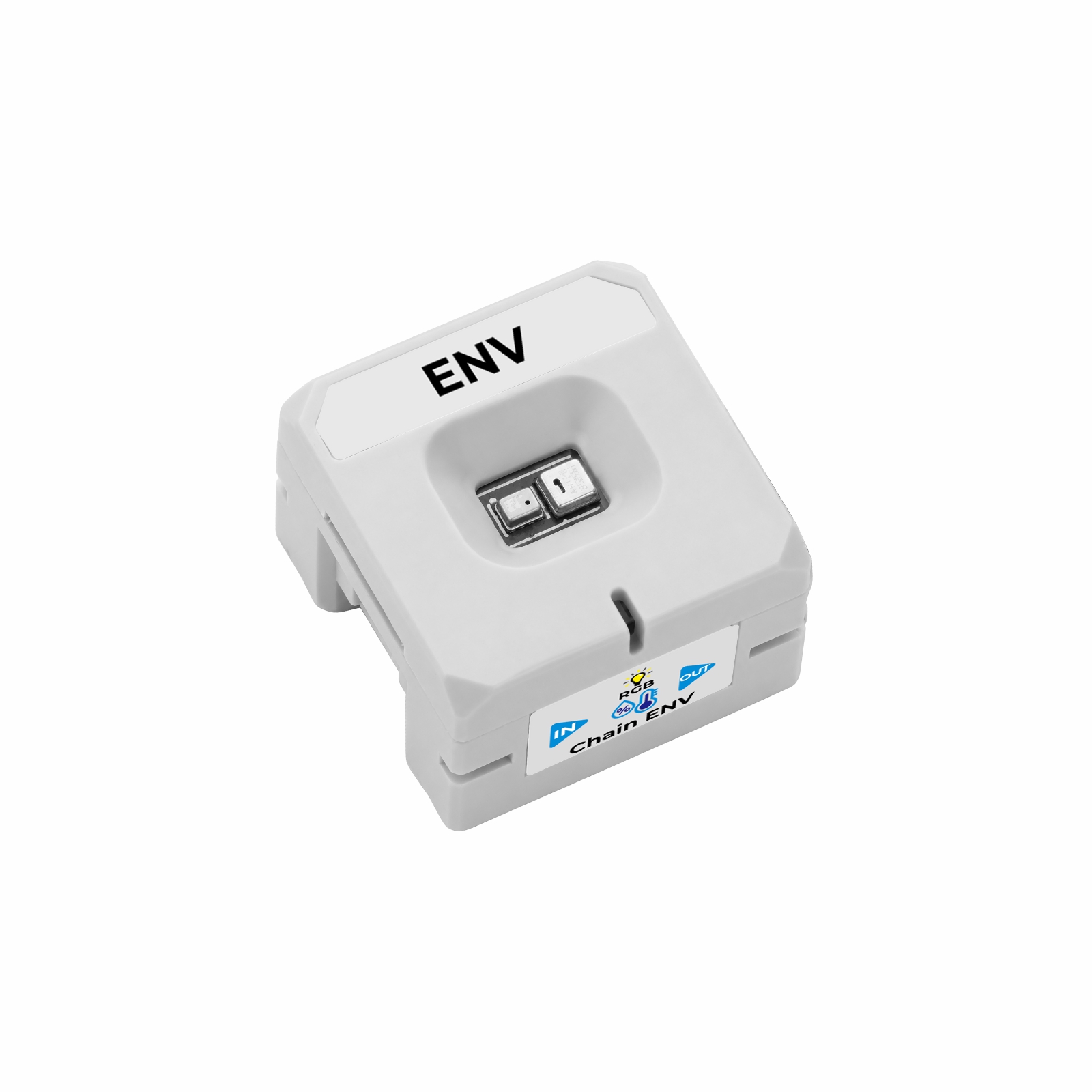
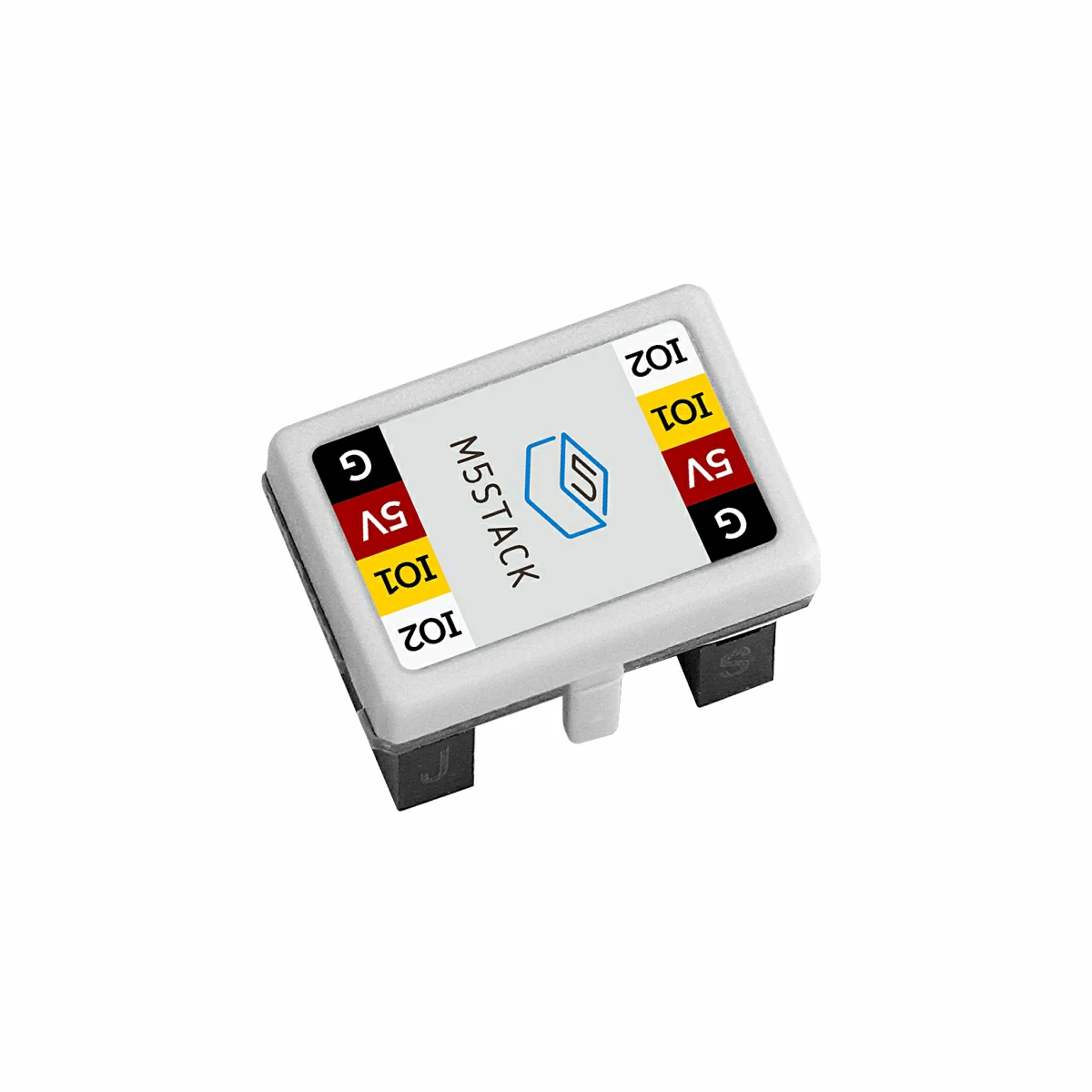
2. サンプルプログラム
Arduino IDE の「ボード」で M5ChainCaptain を選択し、対応するシリアルポートを選択します。
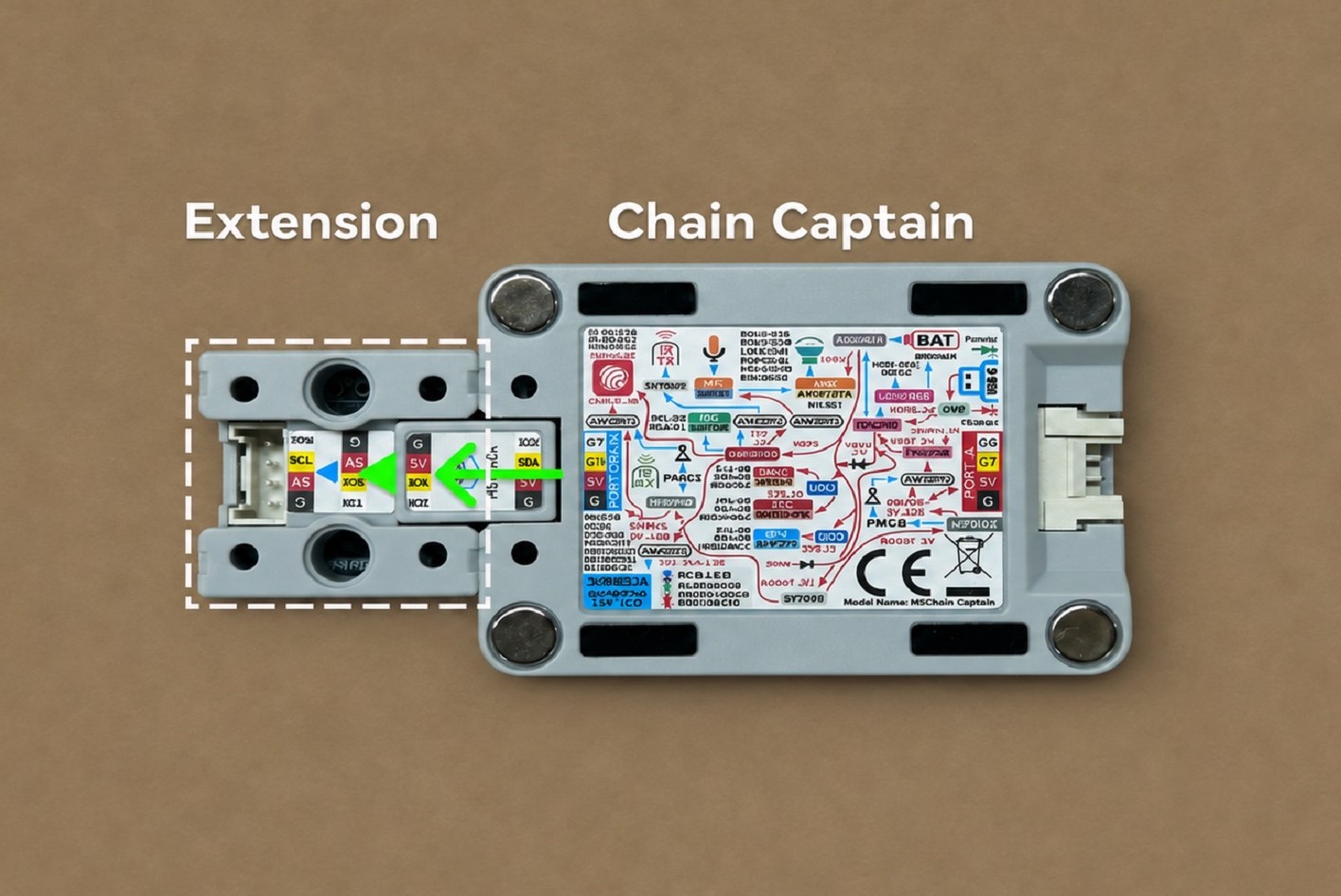
Chain Bridge コネクタを使用して、メインコントローラの Chain Captain と Chain ENV を接続します。接続方向に注意し、下図のように三角形の矢印が Chain Captain から外側へ向くようにしてください。
TXD_PIN = GPIO_NUM_18(GPIO18)
本サンプルでは Chain Captain の Chain インターフェースを使用し、GPIO17 を RX、GPIO18 を TX として使用します(UART1 に対応)。別のホストデバイスを使用する場合は、実際の配線に合わせてプログラム内の RXD_PIN と TXD_PIN を変更してください。
2.1 環境データの読み取り
Chain ENV には AHT20 温湿度センサーと SPA06 気圧センサーが搭載されています。本サンプルでは getAHT20Data() で温度と湿度を、getSPA06Data() で温度、気圧、高度を取得し、Chain Captain の画面にリアルタイムで表示します。プログラムは Chain ENV の電源投入を自動的に待機し、最大約 5 秒間リトライします。それでもデバイスが検出されない場合、画面には ENV ERROR と表示されます。
#include <M5Chain.h>
#include <M5Unified.h>

#define RXD_PIN GPIO_NUM_17  // Chain Captain Chain RX
#define TXD_PIN GPIO_NUM_18  // Chain Captain Chain TX

// Maximum number of devices handled by this demo.
constexpr uint8_t MAX_DEVICES = 16;

Chain M5Chain;
uint8_t env_id = 0;

void applyTitleFont()
{
    // FreeSans is rounder and softer than the default bitmap font.
    M5.Display.setFont(&fonts::FreeSans18pt7b);
    M5.Display.setTextSize(1);
}

void applyBodyFont()
{
    M5.Display.setFont(&fonts::FreeSans12pt7b);
    M5.Display.setTextSize(1);
}

void showStatus(const char *text, uint16_t color)
{
    // Show one centered status message on the Chain Captain display.
    M5.Display.fillScreen(TFT_BLACK);
    M5.Display.setTextDatum(middle_center);
    M5.Display.setTextColor(color, TFT_BLACK);
    applyBodyFont();
    M5.Display.drawString(text, M5.Display.width() / 2, M5.Display.height() / 2);
}

bool findENV()
{
    // The ENV node needs a short startup time after Chain 5V is enabled.
    // Retry for about 5 seconds before reporting an error.
    for (uint8_t attempt = 0; attempt < 10; ++attempt) {
        if (M5Chain.isDeviceConnected(3)) {
            uint16_t device_count = 0;
            if (M5Chain.getDeviceNum(&device_count) == CHAIN_OK &&
                device_count > 0 && device_count <= MAX_DEVICES) {
                device_info_t devices[MAX_DEVICES];
                device_list_t device_list{device_count, devices};
                if (M5Chain.getDeviceList(&device_list)) {
                    for (uint16_t i = 0; i < device_count; ++i) {
                        if (devices[i].device_type == CHAIN_ENV_TYPE_CODE) {
                            env_id = devices[i].id;
                            return true;
                        }
                    }
                }
            }
        }
        delay(500);
    }
    return false;
}

void showEnvironment(float aht_temp, uint8_t humidity,
                     float pressure, float altitude)
{
    char line[32];
    const int cx = M5.Display.width() / 2;

    M5.Display.fillScreen(TFT_BLACK);
    M5.Display.setTextDatum(middle_center);

    M5.Display.setTextColor(TFT_WHITE, TFT_BLACK);
    applyTitleFont();
    M5.Display.drawString("CHAIN ENV", cx, 24);

    M5.Display.setTextColor(TFT_GREEN, TFT_BLACK);
    applyBodyFont();
    snprintf(line, sizeof(line), "TEMP  %.2f C", aht_temp);
    M5.Display.drawString(line, cx, 72);

    snprintf(line, sizeof(line), "HUMI  %u %%RH", (unsigned)humidity);
    M5.Display.drawString(line, cx, 108);

    M5.Display.setTextColor(TFT_CYAN, TFT_BLACK);
    snprintf(line, sizeof(line), "PRESS %.1f hPa", pressure);
    M5.Display.drawString(line, cx, 152);

    snprintf(line, sizeof(line), "ALT   %.1f m", altitude);
    M5.Display.drawString(line, cx, 188);
}

void setup()
{
    // Chain Captain uses M5IOE1 for display and power control.
    // Wait for the expander to finish booting before M5.begin().
    delay(520);

    auto cfg = M5.config();
    cfg.serial_baudrate = 115200;
    M5.begin(cfg);
    Serial.begin(115200);

    M5Chain.begin(&Serial1, 115200, RXD_PIN, TXD_PIN);

    // Chain power-up resets the panel; run the same init as M5.begin().
    M5.Display.init();
    M5.Display.setBrightness(255);

    showStatus("STARTING", TFT_WHITE);

    if (!findENV()) {
        Serial.println("Chain ENV not found");
        showStatus("ENV ERROR", TFT_RED);
        return;
    }

    Serial.printf("Chain ENV found, id=%u\n", (unsigned)env_id);
}

void loop()
{
    if (env_id == 0) {
        delay(1000);
        return;
    }

    int16_t aht_temp = 0;
    uint8_t humidity = 0;
    int16_t spa_temp = 0;
    uint16_t pressure = 0;
    int32_t altitude = 0;

    chain_status_t aht_status = M5Chain.getAHT20Data(env_id, &aht_temp, &humidity);
    chain_status_t spa_status = M5Chain.getSPA06Data(env_id, &spa_temp, &pressure, &altitude);

    if (aht_status != CHAIN_OK || spa_status != CHAIN_OK) {
        Serial.printf("Read failed: AHT20=%d SPA06=%d\n", aht_status, spa_status);
        showStatus("READ ERROR", TFT_RED);
        delay(1000);
        return;
    }

    float temp_c = aht_temp / 100.0f;
    float pressure_hpa = pressure / 10.0f;
    float altitude_m = altitude / 100.0f;

    Serial.printf("AHT20: %.2f C, %u %%RH\n", temp_c, (unsigned)humidity);
    Serial.printf("SPA06: %.2f C, %.1f hPa, %.2f m\n",
                  spa_temp / 100.0f, pressure_hpa, altitude_m);

    showEnvironment(temp_c, humidity, pressure_hpa, altitude_m);
    delay(1000);
}
プログラムを書き込むと、画面に AHT20 の温度・湿度と SPA06 の気圧・高度が表示されます。シリアル出力は次のとおりです:
Chain ENV found, id=1
AHT20: 26.32 C, 66 %RH
SPA06: 27.76 C, 1009.5 hPa, 32.10 mgetAHT20Data() が返す温度の単位は 0.01°C、湿度の単位は %RH です。getSPA06Data() が返す温度の単位は 0.01°C、気圧の単位は 0.1hPa、高度の単位は cm です。プログラム内でこれらの値を換算しています。
2.2 高度計とキャリブレーション
SPA06 の高度の読み値は、実測気圧から換算されます:
Altitude_m = 44330 * [1 - (P / P0)^0.1903]
ここで P は SPA06 の実測気圧、P0 は現地の海面気圧です。デバイスのデフォルトは P0 = 1013.3 hPa で、実際の現地海面気圧と一致しない場合、高度の読み値に誤差が生じます。
次のサンプルは完全な高度計です。電源投入後、温度、湿度、気圧、高度、現在の P0 をリアルタイムで表示し、ボタンによるキャリブレーションにも対応します。
OK短押し:現在位置の高度を 0 m として記録し、相対高度モードに移行します。もう一度PREVを短押しすると絶対高度モードに戻ります。OKを 1 秒長押し:REFERENCE_ALTITUDE_CMに基づいてキャリブレーションし、P0を Chain Captain の NVS に保存します。NEXT短押し:SEA_LEVEL_PRESSURE_HPA_X10を ENV に書き込み、Chain Captain の NVS に保存します。
使用前に、実際の場所に合わせてコード先頭の 2 つの値を変更してください:
SEA_LEVEL_PRESSURE_HPA_X10:現地のリアルタイム海面気圧。単位は 0.1 hPa で、例えば 1014.4 hPa は10144と記述します。REFERENCE_ALTITUDE_CM:Chain ENV が設置されている場所の実際の高度。単位は cm で、例えば 50.00 m は5000と記述します。
2 つの絶対キャリブレーション方法のうち、どちらか一方を選べば十分です。結果は Chain Captain の NVS に保存され、電源を切っても失われません。電源投入のたびに、プログラムは保存された P0 を自動的に Chain ENV へ書き戻します。OK 短押しによるゼロ点合わせは表示にのみ影響し、NVS には書き込まれないため、再起動後は自動的に絶対高度モードに戻ります。
#include <M5Chain.h>
#include <M5Unified.h>
#include <Preferences.h>
#include <math.h>
#include <type_traits>

#define RXD_PIN GPIO_NUM_17  // Chain Captain Chain RX
#define TXD_PIN GPIO_NUM_18  // Chain Captain Chain TX

// Local sea-level pressure in hPa x10. 1013.3 hPa -> 10133.
constexpr uint16_t SEA_LEVEL_PRESSURE_HPA_X10 = 10133;

// Known altitude of the sensor in cm, used by the long-press calibration.
constexpr int32_t REFERENCE_ALTITUDE_CM = 3210;

static_assert(SEA_LEVEL_PRESSURE_HPA_X10 >= 3000 &&
                  SEA_LEVEL_PRESSURE_HPA_X10 <= 11000,
              "Sea-level pressure must be 300.0 ~ 1100.0 hPa");


constexpr uint8_t MAX_DEVICES = 16;
constexpr uint32_t READ_INTERVAL_MS = 1000;
constexpr uint32_t HOLD_MS = 1000;

template <typename T>
struct FourthArg;

template <typename R, typename C, typename A1, typename A2, typename A3,
          typename A4, typename... Rest>
struct FourthArg<R (C::*)(A1, A2, A3, A4, Rest...)> {
    using type = A4;
};

using SetP0Arg = typename FourthArg<decltype(&Chain::setSPA06SeaLevelPressure)>::type;

Chain M5Chain;
Preferences prefs;
uint8_t env_id = 0;

int16_t aht_temp = 0;
uint8_t humidity = 0;
int16_t spa_temp = 0;
uint16_t pressure = 0;
int32_t altitude_cm = 0;

bool relative_mode = false;
int32_t zero_offset_cm = 0;
uint16_t sea_level_pressure = 0;

char status_text[24] = "ABS MODE";
uint32_t status_until = 0;
bool hold_done = false;

void setStatus(const char *text, uint32_t duration = 3000)
{
    strncpy(status_text, text, sizeof(status_text) - 1);
    status_text[sizeof(status_text) - 1] = '\0';
    status_until = millis() + duration;
}

const char *currentStatus()
{
    if (millis() < status_until) {
        return status_text;
    }
    return relative_mode ? "REL MODE" : "ABS MODE";
}

bool findENV()
{
    // The ENV node needs a short startup time after Chain 5V is enabled.
    for (uint8_t attempt = 0; attempt < 10; ++attempt) {
        if (M5Chain.isDeviceConnected(3)) {
            uint16_t device_count = 0;
            if (M5Chain.getDeviceNum(&device_count) == CHAIN_OK &&
                device_count > 0 && device_count <= MAX_DEVICES) {
                device_info_t devices[MAX_DEVICES];
                device_list_t device_list{device_count, devices};
                if (M5Chain.getDeviceList(&device_list)) {
                    for (uint16_t i = 0; i < device_count; ++i) {
                        if (devices[i].device_type == CHAIN_ENV_TYPE_CODE) {
                            env_id = devices[i].id;
                            return true;
                        }
                    }
                }
            }
        }
        delay(500);
    }
    return false;
}

bool readP0()
{
    uint16_t p0 = 0;
    if (M5Chain.getSPA06SeaLevelPressure(env_id, &p0) != CHAIN_OK) {
        return false;
    }
    sea_level_pressure = p0;
    return true;
}

bool readSensors()
{
    bool ok = true;
    if (M5Chain.getAHT20Data(env_id, &aht_temp, &humidity) != CHAIN_OK) {
        ok = false;
    }
    if (M5Chain.getSPA06Data(env_id, &spa_temp, &pressure, &altitude_cm) != CHAIN_OK) {
        ok = false;
    }
    return ok;
}

uint16_t loadP0()
{
    if (!prefs.begin("chain_env", true)) {
        return SEA_LEVEL_PRESSURE_HPA_X10;
    }
    uint16_t p0 = prefs.getUShort("p0", SEA_LEVEL_PRESSURE_HPA_X10);
    prefs.end();
    return p0;
}

void saveP0(uint16_t p0)
{
    if (!prefs.begin("chain_env", false)) {
        return;
    }
    prefs.putUShort("p0", p0);
    prefs.end();
}

bool setP0(uint16_t p0)
{
    uint8_t operation_status = 0;
    // 1.0.10 uses the fourth argument as timeout; 1.0.11 uses it as save flag.
    const SetP0Arg arg = std::is_same<SetP0Arg, unsigned long>::value
                             ? SetP0Arg(100)
                             : SetP0Arg(0);
    chain_status_t status = M5Chain.setSPA06SeaLevelPressure(
        env_id, p0, &operation_status, arg);
    return status == CHAIN_OK && operation_status == 1;
}

bool calibrateByReference()
{
    uint32_t pressure_sum = 0;
    uint8_t samples = 0;

    for (uint8_t i = 0; i < 16; ++i) {
        int16_t sample_temp = 0;
        uint16_t sample_pressure = 0;
        int32_t sample_altitude = 0;
        if (M5Chain.getSPA06Data(env_id, &sample_temp, &sample_pressure,
                                 &sample_altitude) == CHAIN_OK) {
            pressure_sum += sample_pressure;
            ++samples;
        }
        delay(250);
    }

    if (samples == 0) {
        return false;
    }

    const float average_hpa = pressure_sum / (10.0f * samples);
    const float reference_m = REFERENCE_ALTITUDE_CM / 100.0f;
    const float base = 1.0f - reference_m / 44330.0f;
    if (base <= 0.0f) {
        return false;
    }

    const float p0_hpa = average_hpa / powf(base, 1.0f / 0.1903f);
    const long p0_x10 = lroundf(p0_hpa * 10.0f);
    if (p0_x10 < 3000 || p0_x10 > 11000) {
        return false;
    }

    if (!setP0((uint16_t)p0_x10)) {
        return false;
    }
    saveP0((uint16_t)p0_x10);
    return true;
}

void drawScreen()
{
    char line[32];
    M5.Display.fillScreen(TFT_BLACK);

    M5.Display.setTextDatum(middle_center);
    M5.Display.setFont(&fonts::FreeSans12pt7b);
    M5.Display.setTextColor(TFT_WHITE, TFT_BLACK);
    M5.Display.drawString("CHAIN ENV", 120, 18);

    M5.Display.setTextDatum(middle_left);
    M5.Display.setFont(&fonts::FreeSans9pt7b);

    M5.Display.setTextColor(TFT_GREEN, TFT_BLACK);
    snprintf(line, sizeof(line), "TEMP  %.2f C", aht_temp / 100.0f);
    M5.Display.drawString(line, 16, 50);

    snprintf(line, sizeof(line), "HUMI  %u %%RH", (unsigned)humidity);
    M5.Display.drawString(line, 16, 80);

    M5.Display.setTextColor(TFT_CYAN, TFT_BLACK);
    snprintf(line, sizeof(line), "PRESS %.1f hPa", pressure / 10.0f);
    M5.Display.drawString(line, 16, 110);

    const int32_t shown_altitude = relative_mode ? (altitude_cm - zero_offset_cm) : altitude_cm;
    M5.Display.setTextDatum(middle_center);
    M5.Display.setFont(&fonts::FreeSans12pt7b);
    M5.Display.setTextColor(TFT_YELLOW, TFT_BLACK);
    snprintf(line, sizeof(line), "ALT %.2f m", shown_altitude / 100.0f);
    M5.Display.drawString(line, 120, 150);

    M5.Display.setFont(&fonts::FreeSans9pt7b);
    M5.Display.setTextColor(TFT_DARKGREY, TFT_BLACK);
    if (sea_level_pressure != 0) {
        snprintf(line, sizeof(line), "%s  P0 %.1f", relative_mode ? "REL" : "ABS",
                 sea_level_pressure / 10.0f);
    } else {
        snprintf(line, sizeof(line), "%s  P0 --", relative_mode ? "REL" : "ABS");
    }
    M5.Display.drawString(line, 120, 188);

    M5.Display.setTextColor(TFT_YELLOW, TFT_BLACK);
    M5.Display.drawString(currentStatus(), 120, 214);
}

void setup()
{
    // Chain Captain uses M5IOE1 for display and power control.
    // Wait for the expander to finish booting before M5.begin().
    delay(520);

    auto cfg = M5.config();
    cfg.serial_baudrate = 115200;
    M5.begin(cfg);
    Serial.begin(115200);

    M5Chain.begin(&Serial1, 115200, RXD_PIN, TXD_PIN);

    // Chain power-up resets the panel; run the same init as M5.begin().
    M5.Display.init();
    M5.Display.setBrightness(255);

    M5.Display.fillScreen(TFT_BLACK);
    M5.Display.setTextDatum(middle_center);
    M5.Display.setFont(&fonts::FreeSans12pt7b);
    M5.Display.setTextColor(TFT_WHITE, TFT_BLACK);
    M5.Display.drawString("STARTING", 120, 120);

    if (!findENV()) {
        Serial.println("Chain ENV not found");
        M5.Display.fillScreen(TFT_BLACK);
        M5.Display.setTextColor(TFT_RED, TFT_BLACK);
        M5.Display.drawString("ENV ERROR", 120, 120);
        return;
    }
    Serial.printf("Chain ENV found, id=%u\n", (unsigned)env_id);

    const uint16_t boot_p0 = loadP0();
    if (setP0(boot_p0)) {
        Serial.printf("P0 applied: %.1f hPa\n", boot_p0 / 10.0f);
    } else {
        Serial.println("P0 apply failed");
    }
    if (readP0()) {
        Serial.printf("P0: %.1f hPa\n", sea_level_pressure / 10.0f);
    } else {
        Serial.println("P0 read failed");
    }
    if (!readSensors()) {
        Serial.println("Sensor read failed");
    }
    drawScreen();

    M5.BtnA.setHoldThresh(HOLD_MS);
}

void loop()
{
    M5.update();

    static uint32_t last_read = 0;
    if (millis() - last_read >= READ_INTERVAL_MS) {
        last_read = millis();
        if (!readSensors()) {
            setStatus("READ ERR");
        }
        drawScreen();
    }

    if (M5.BtnA.isPressed()) {
        if (!hold_done && M5.BtnA.pressedFor(HOLD_MS)) {
            hold_done = true;
            setStatus("CALIBRATING", 8000);
            drawScreen();
            Serial.printf("Calibrating to %.2f m...\n", REFERENCE_ALTITUDE_CM / 100.0f);
            if (calibrateByReference()) {
                Serial.println("Calibration OK");
                relative_mode = false;
                readP0();
                readSensors();
                setStatus("CAL OK");
            } else {
                Serial.println("Calibration failed");
                setStatus("CAL ERR");
            }
            drawScreen();
        }
    } else {
        if (!hold_done && M5.BtnA.wasClicked()) {
            zero_offset_cm = altitude_cm;
            relative_mode = true;
            setStatus("REL ZERO");
            drawScreen();
        }
        hold_done = false;
    }

    if (M5.BtnB.wasClicked()) {
        relative_mode = false;
        setStatus("ABS MODE");
        drawScreen();
    }

    if (M5.BtnC.wasClicked()) {
        Serial.printf("Setting P0 to %.1f hPa...\n", SEA_LEVEL_PRESSURE_HPA_X10 / 10.0f);
        if (setP0(SEA_LEVEL_PRESSURE_HPA_X10)) {
            saveP0(SEA_LEVEL_PRESSURE_HPA_X10);
            Serial.println("P0 applied and stored");
            sea_level_pressure = SEA_LEVEL_PRESSURE_HPA_X10;
            relative_mode = false;
            readSensors();
            setStatus("P0 OK");
        } else {
            setStatus("P0 ERR");
        }
        drawScreen();
    }
}
画面に P0 -- と表示された場合は海面気圧の読み取りに失敗しています。CAL ERR と表示された場合は長押しキャリブレーションに失敗しています。OK の長押しキャリブレーションには約 4 秒かかるため、その間は Chain ENV を静止させてください。P0 の設定可能範囲は 300.0 ~ 1100.0 hPa です。NEXT を押すと NVS に書き込まれるため、電源投入のたびに押す必要はありません。
キャリブレーション成功後、シリアルには次のように出力されます:
Chain ENV found, id=1
P0 applied: 1013.3 hPa
P0: 1013.3 hPa
Calibrating to 32.10 m...
Calibration OK